
SSL/TLS
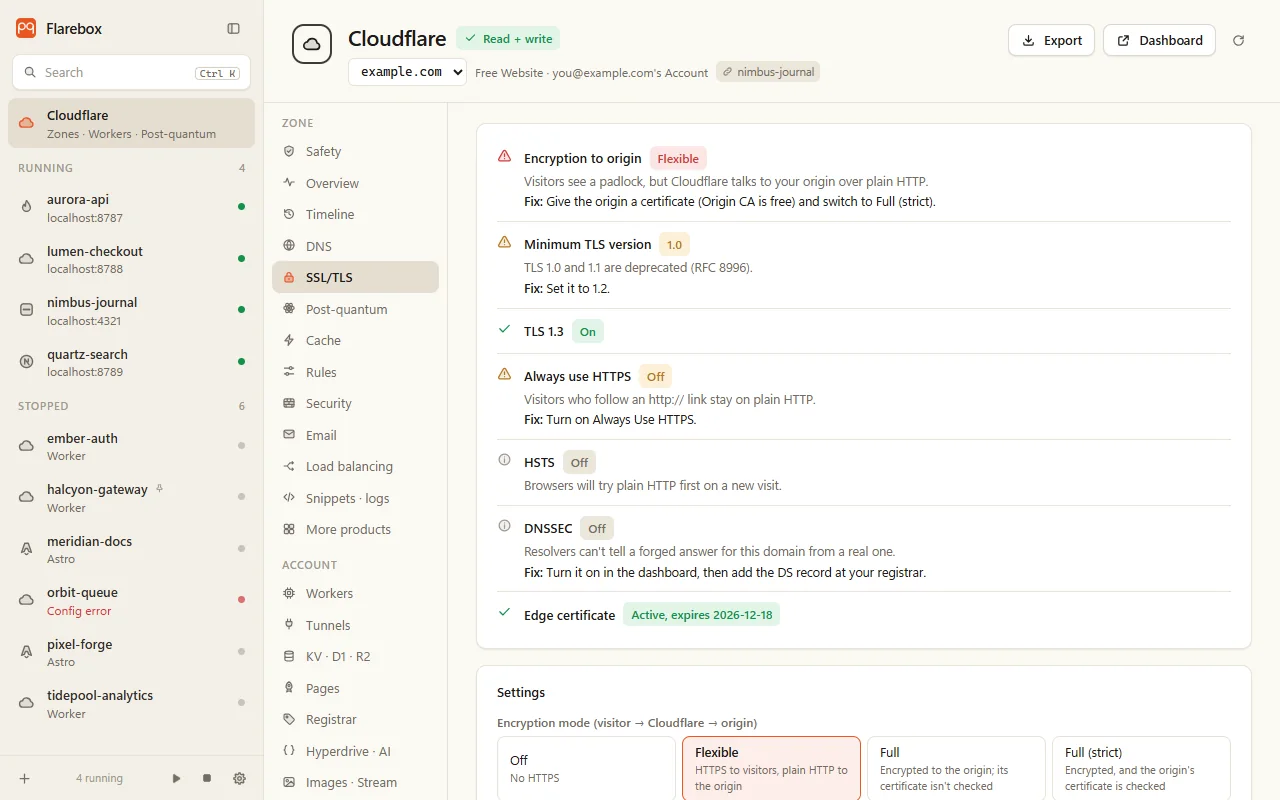
Settings, with causes and fixes
Section titled “Settings, with causes and fixes”| Setting | What Flarebox says |
|---|---|
| Encryption mode | Off / Flexible / Full / Full (strict). Flexible is plain HTTP to the origin; the fix is an origin certificate and Full (strict) |
| Minimum TLS | TLS 1.0 and 1.1 are deprecated (RFC 8996). The fix is 1.2 |
| TLS 1.3 | Needed for post-quantum key exchange to visitors |
| Always Use HTTPS | Without it, http:// links stay on plain HTTP |
| HSTS | See below |
| DNSSEC | See below |
| Edge certificates | Status and expiry, read-only |
Mode, minimum TLS, TLS 1.3 and Always Use HTTPS are editable. Switching to Full (strict) warns that visitors get error 526 if the origin’s certificate isn’t valid, so check first (below).
Would Full (strict) work?
Section titled “Would Full (strict) work?”One TLS handshake per origin behind the zone’s proxied records, with the record’s name as SNI, verified with the Windows trust store. Each origin gets one answer:
- Publicly trusted: Full (strict) works.
- A Cloudflare Origin CA certificate: Cloudflare trusts it, so Full (strict) works.
- Would fail with 526, and why (expired, wrong name, self-signed…).
- Not reachable from this machine: normal for an origin that only accepts Cloudflare’s IPs.
Origin CA certificates
Section titled “Origin CA certificates”Under Origin certificates:
- Lists the zone’s Origin CA certificates with days left.
- Issue one: the private key (ECDSA P-256) and the signing request are made on your machine. Only the request goes to Cloudflare. The key and certificate are saved as new files in a folder you pick (
<host>.origin.pem,<host>.origin.key), never over existing ones. If Cloudflare refuses, the key file is deleted again. The key never reaches the window, history or a log. - An install guide for nginx, Apache, Caddy, HAProxy, Node, Go and IIS.
- Revoke is irreversible, warns about 526 under Full (strict), and needs the hostname typed.
Issuing needs Zone → SSL and Certificates → Edit on the write token. Origin CA certificates are trusted by Cloudflare only, so they’re only for proxied records.
On or off, Cloudflare’s max-age choices, includeSubDomains, preload and nosniff.
Preload is refused without includeSubDomains and at least 12 months. Flarebox never submits your domain to the preload list.
DNSSEC
Section titled “DNSSEC”- Turning it on is a two-step review. Then Flarebox shows the DS record (key tag, algorithm, digest) with a copy button, for your registrar.
- Turning it off first asks DNS over HTTPS whether the parent zone still publishes a DS record. If it does, or if it can’t tell, Flarebox warns that the domain will stop resolving for validating resolvers, and needs the zone name typed.
Post-quantum
Section titled “Post-quantum”The old “origin post-quantum encryption” setting is deprecated, and writing it does nothing, so Flarebox doesn’t. Post-quantum to the origin is Cloudflare’s default (“Automatic key exchange”). What varies is the origin, which is what the Post-quantum tab checks.
Further down this tab, Post-quantum authentication on the origin hop covers both directions: Cloudflare checking the origin (ML-DSA origin certificates) and the origin checking Cloudflare (Authenticated Origin Pulls).