
Authenticated Origin Pulls (ML-DSA)
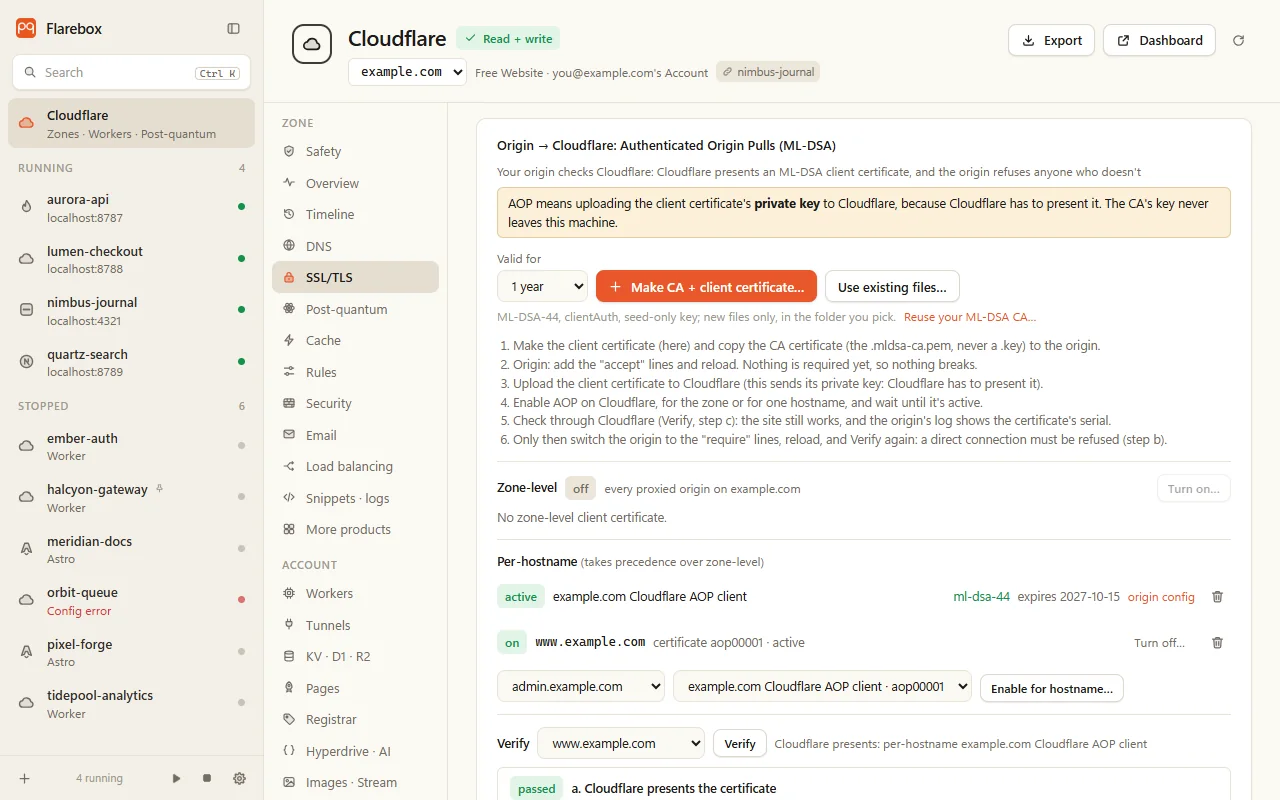
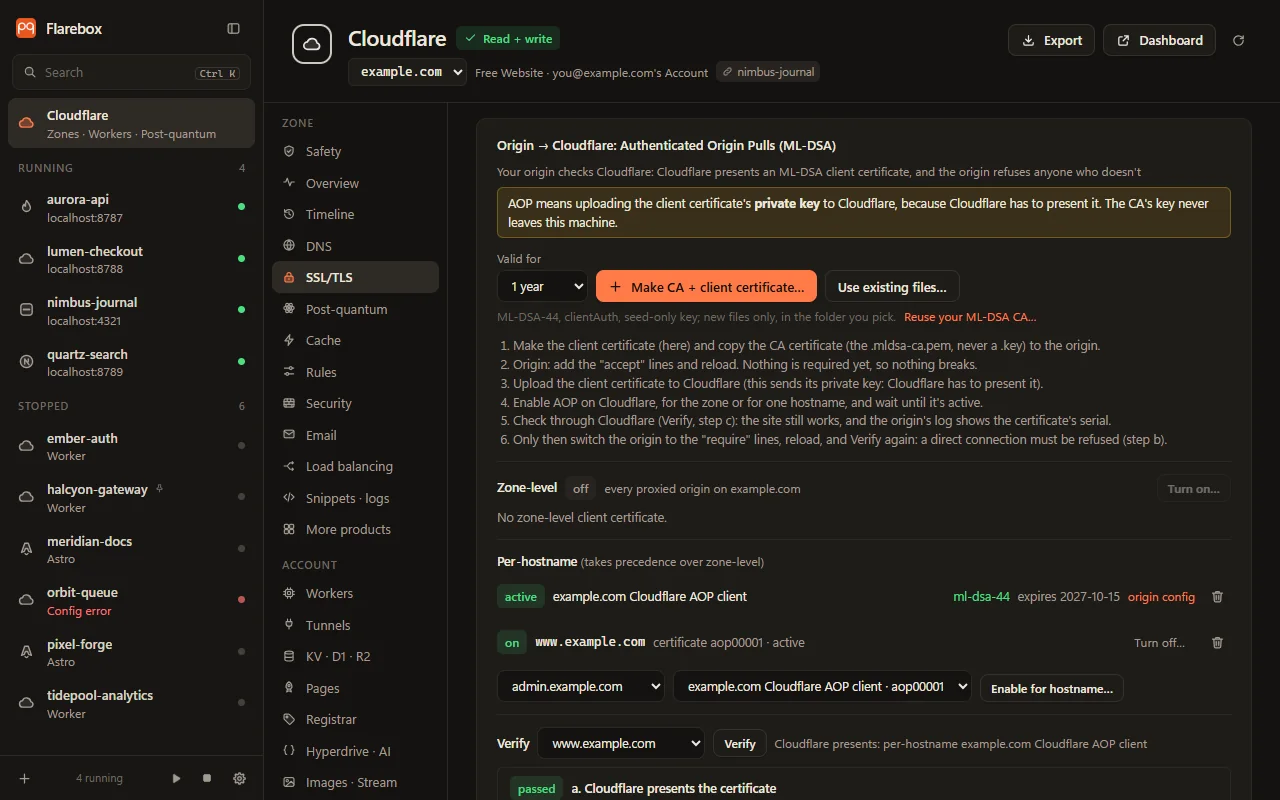
The trust store lets Cloudflare check the origin. Authenticated Origin Pulls (AOP) is the other direction: the origin checks Cloudflare. Cloudflare presents a client certificate when it connects, and the origin refuses anyone who doesn’t present it. Since June 2026 Cloudflare accepts customer-uploaded ML-DSA client certificates for zone-level and per-hostname AOP (changelog, docs). Together, the two cover post-quantum authentication on the origin hop in both directions.
What Cloudflare accepts
Section titled “What Cloudflare accepts”| Scopes | Zone-level and per-hostname; per-hostname takes precedence. Global AOP uses Cloudflare’s own certificate, which has no ML-DSA option yet |
| Parameter sets | ML-DSA-44, -65 and -87; ML-DSA-44 is recommended |
| Key encoding | Seed-only PKCS#8 (about 54 bytes). The expanded form is refused |
| Certificate | A leaf with clientAuth, not a CA |
| Requirements | Any plan; encryption mode Full or Full (strict); not for names served through a Tunnel |
| Token | Zone → SSL and Certificates → Read; Edit to upload or enable |
The safe order
Section titled “The safe order”Requiring the certificate at the origin before Cloudflare presents it takes the site down, so the steps run in this order:
- Make CA + client certificate… (or Reuse your ML-DSA CA…): an ML-DSA-44 client certificate with
extendedKeyUsage = clientAuth, signed by your private ML-DSA CA, written as new files with a seed-only key. Copy the CA certificate (never a key) to the origin. - On the origin, add the accept lines and reload. Nothing is required yet, so nothing breaks.
- Upload the client certificate to Cloudflare, for the zone or for hostnames, as a reviewed change with undo.
- Enable AOP for the zone or for one hostname, and wait until it’s active.
- Verify, step c: the site still works through Cloudflare, and the origin’s log shows the certificate’s serial.
- Only then switch the origin to the require lines, reload, and Verify again: a direct connection must now be refused (step b).
# Post-quantum Authenticated Origin Pulls. Needs nginx built with OpenSSL 3.5+ (nginx -V).# The CA certificate only (public); its key stays off the server.ssl_client_certificate /etc/ssl/cloudflare-aop-ca.pem;ssl_verify_depth 1;ssl_verify_client on;# Only Cloudflare's client certificate, not another one from the same CA:if ($ssl_client_serial != "<serial>") { return 403; }The Apache version uses SSLCACertificateFile, SSLVerifyClient optional then require, and a Require expr on SSL_CLIENT_M_SERIAL.
Verify
Section titled “Verify”| Step | What it proves |
|---|---|
| a. Cloudflare presents the certificate | The API reports an active client certificate for the hostname (per-hostname over zone-level) |
| b. The origin refuses a connection without one | A direct TLS connection to the origin address in DNS, with no client certificate, is refused (a TLS alert after a CertificateRequest, or nginx’s 400 “No required SSL certificate was sent”). “Optional” or never asked fails |
| c. The site works through Cloudflare | A GET / through Cloudflare succeeds, so the origin accepts what Cloudflare presents |
Turning AOP off, or deleting the certificate, warns that an origin which requires it goes down, and asks for the name to be typed when the last Verify found that the origin requires it. The Safety tab lists that mismatch. Undo returns each change to its previous state; deleting a certificate can’t be undone, because Flarebox keeps no copy of the key.
If the upload is refused because the key is in ML-DSA’s expanded form, re-export the seed only:
openssl pkey -in KEY -out KEY.seed -provparam ml-dsa.output_formats=seed-onlyVerified
Section titled “Verified”Rust tests cover the certificate encoding (the id-ml-dsa-44 OID, clientAuth only, not a CA, chains to the CA, seed-only key) and upload, enable and undo through the change path against a fake API that echoes the key back. The native end-to-end test drives a real Node/OpenSSL 3.5 origin from accept to require. OpenSSL 3.6.1 verifies the certificate and completes a client-certificate handshake with it. Not yet: an upload or Verify on a real zone.