Timeline, alerts and more
Timeline
Section titled “Timeline”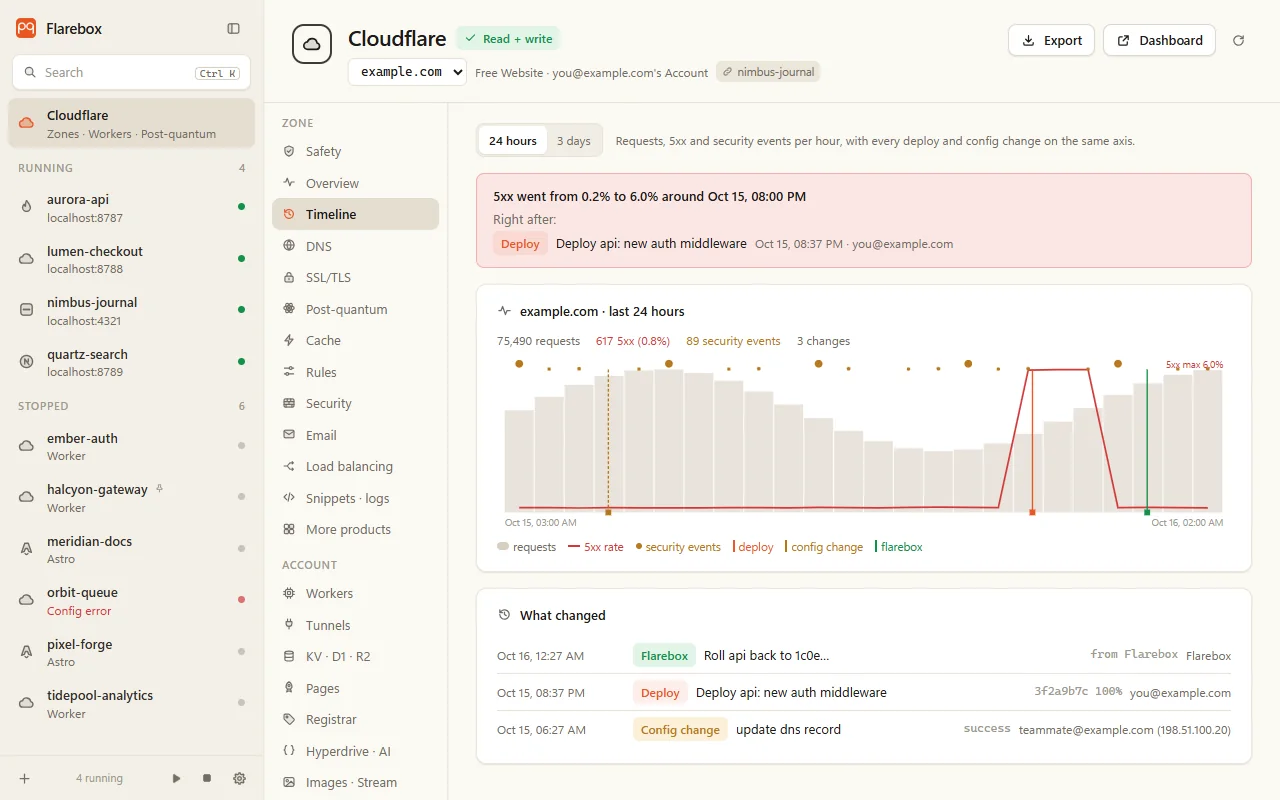
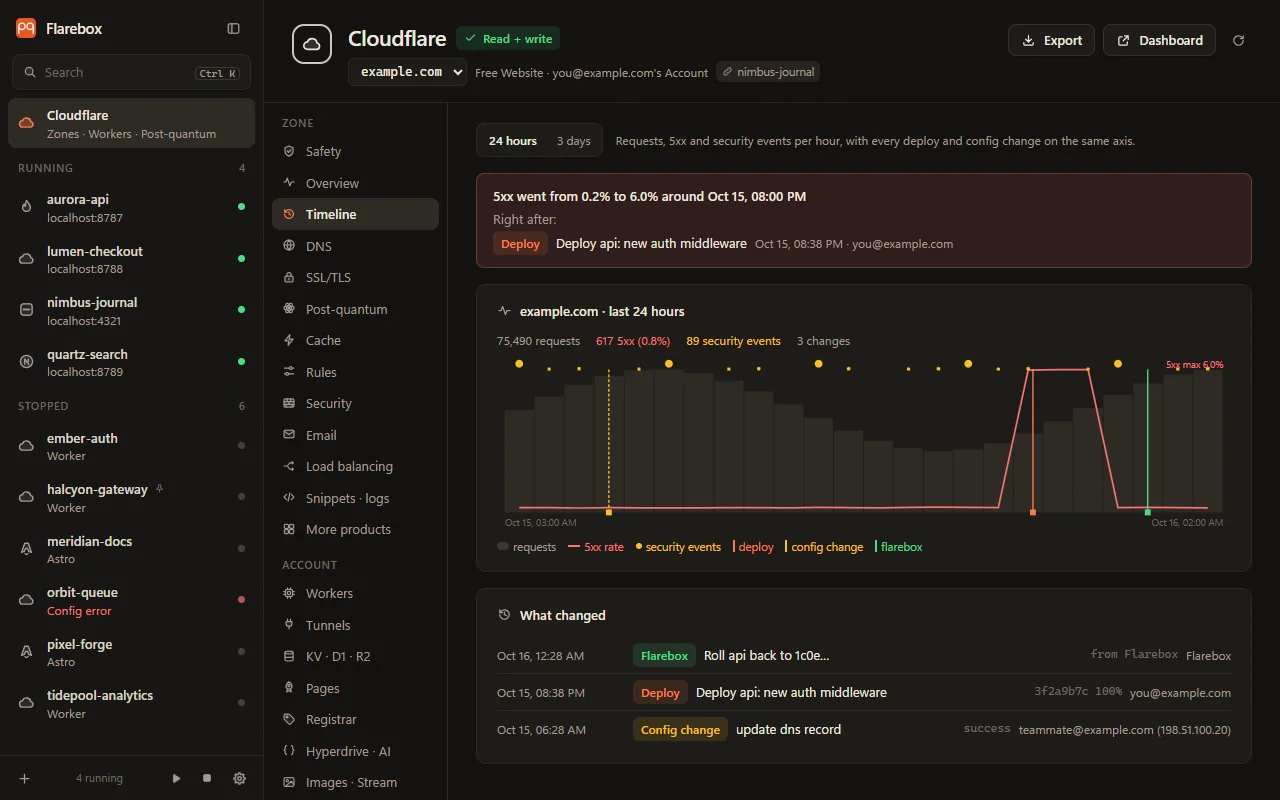
Zone → Timeline puts requests, the 5xx rate and security events per hour (24 hours or 3 days) on one axis with:
- deploys of the Workers on the zone’s routes,
- changes from the account’s audit log,
- Flarebox’s own changes.
When the 5xx rate jumps right after a change (at least 1% and 3× the three hours before), it says so: errors started right after this change, with the likely causes first.
Alerts
Section titled “Alerts”Every 15 minutes (the first check 2 minutes after start), with the read token only, Flarebox checks:
- each zone’s 5xx share over its last two hours (warn at 5%, serious at 20%, with at least 50 requests an hour);
- Workers with at least 10 errors and 5% of requests in the last hour;
- edge certificates that aren’t active or have under 14 days left (they renew on their own, so that means a stuck renewal);
- Origin CA certificates with under 30 days left;
- unhealthy load-balancer pools and origins;
- DNS and SSL/TLS changes made outside Flarebox;
- an origin that was post-quantum and isn’t any more.
Each problem shows in the tray once, then again only if it’s still there a day later. Flarebox → Alerts runs the same checks on demand, lists what the token couldn’t read, and Open goes to the tab that shows each one. The switch there turns tray alerts off.
Registrar domains expiring soon (under 30 days without auto-renew, or under 7 days at all) also raise a notification.
Workers in production
Section titled “Workers in production”Account → Workers: per Worker and per version, requests, errors, CPU p50 and p99, and wall time p99. Each Worker’s deployments (who, the message, the versions and their percentages), and recent errors from Workers Logs.
A Worker without Workers Logs gets a note on turning it on ([observability] enabled = true).
Live KV, D1 and R2
Section titled “Live KV, D1 and R2”Account → KV · D1 · R2 works on your real account’s data:
- KV: namespaces, keys with prefix search, values as text. Put keeps the key’s metadata and expiration; put and delete are undoable for text values. Binary values and values over 1 MB are shown by size and never overwritten. A value your Worker changed after you reviewed it is refused.
- D1: one
SELECT,PRAGMAorEXPLAINruns straight away. Anything else is a reviewed, irreversible change with the database name typed, and the warning points at D1 Time Travel. - R2: buckets, folders and objects. Deleting needs the key typed.
The product catalog
Section titled “The product catalog”More products, under Zone and under Account, is a searchable grid of 28 products, each with its settings and lists:
| Zone | Account |
|---|---|
| Security settings, IP access rules, Bots, API Shield, Client-side security, Waiting Room, Speed, Zaraz, Health Checks, Snippets, Custom Hostnames, Workers routes, Logpush | Lists, IP access rules, Turnstile, Email Security, Notifications, Logpush, Web Analytics, AI Gateway, Secrets Store (names only), Workers custom domains, Queues, DLP and Magic Transit / WAN (read-only) |
Every write is a reviewed change with undo where Flarebox can rebuild the item. Deletes it can’t rebuild are irreversible and need the name typed. A part the token or plan can’t read says which permission it needs, instead of failing the page.
Every other tab
Section titled “Every other tab”| Tab | |
|---|---|
| Overview | Hourly requests, cached share, 5xx, threats and bytes; status classes and top countries over 24 h, 3 or 7 days |
| Email Routing status, rules, destinations, and the DNS records it needs, marked present or missing, with Add for missing ones | |
| Load balancing | Load balancers, pools and origin health; create and edit pools and balancers; pqdoctor on pool origins |
| Snippets · logs | Snippets (refused up front when the plan allows none), API schemas, Logpush jobs. Logpush credentials are stored as *** in history |
| Pages | Projects and production deployments, with roll back to a deployment |
| Registrar | Domains with expiry, auto-renew and lock. Renewals stay in the dashboard |
| Hyperdrive · AI | Hyperdrive configs (the API never returns passwords), Vectorize indexes, Workers AI models |
| Images · Stream | Images upload (up to 10 MB) and delete; Stream videos and delete |
| Zero Trust | Access apps, reusable policies with a who-can-reach-what summary, Gateway rules. Read-only |
| Audit log | The account’s audit log for 1, 7 or 30 days, and members with roles, flagging any without 2FA |
| Usage | Workers requests, errors and subrequests per script against the Free plan’s 100,000 a day; D1, R2 and KV usage for 7 days |
| History | Every change Flarebox made: ok, checked, refused or undone, with Undo |